
30 July 2025
Last updated: December 2025
Written by: Kidddo team; with 10+ years working with churches and child check-in systems
TL;DR - Quick Summary
A check-in system with custom fields lets you collect exactly the information you need - like allergies, authorized pickup, or medical notes - without workarounds. The best systems make custom fields easy to create, flexible to display (including on labels), and simple to report on. This guide explains what to look for, common mistakes to avoid, and how Kidddo handles custom fields cleanly and safely.
Table of Contents
What Is a Check-In System With Custom Fields?
Why Custom Fields Matter More Than You Think
Common Problems With “Custom Fields” in Most Systems
Examples of High-Value Custom Fields
Where Custom Fields Should Appear (Forms, Labels, Reports)
How Kidddo Handles Custom Fields Differently
What to Look for When Evaluating Custom Fields
Frequently Asked Questions
Try Custom Fields in Kidddo
Check-In System With Custom Fields: A Complete Guide
1. What Is a Check-In System With Custom Fields?
A check-in system with custom fields allows you to collect information beyond basic names and contact details. Custom fields let you define exactly what data matters to your organization - such as allergies, medical notes, custody restrictions, or classroom-specific details - and attach that information to a child’s profile or check-in flow.
In practical terms, custom fields help you:
Improve safety and clarity
Reduce manual notes or side systems
Capture consistent data across families
Display critical information where it’s actually needed
For churches, childcare programs, daycares, and ministries, custom fields often become the difference between a system that technically works and one that truly supports day-to-day operations.
2. Why Custom Fields Matter More Than You Think
Many organizations don’t realize they need custom fields until something goes wrong.
Without them, teams rely on:
Sticky notes
Printed rosters
Verbal handoffs
"We just remember it" processes
Custom fields solve this by making important information:
Structured (always collected the same way)
Visible (shown to the right people)
Reliable (available every time someone checks in)
For example, capturing allergy information in a dedicated custom field is far safer than burying it in free-text notes that volunteers may miss.
3. Common Problems With "Custom Fields" in Most Systems
Not all custom fields are created equal. Many platforms technically offer them, but with serious limitations.
Common frustrations include:
Fields that only appear during setup, not at check-in
Custom fields that can’t be shown on printed labels
Data that can’t be filtered or exported later
Complex configuration that requires admin-level expertise
Per-field or per-feature pricing that adds up quickly
If a system advertises custom fields but makes them hard to use, teams often stop using them altogether, defeating the point.
4. Examples of High-Value Custom Fields
The most useful custom fields are simple, specific, and actionable.
Common examples include:
Allergies or medical notes
Authorized pickup names
Special needs or accommodations
Classroom-specific questions
Care instructions for younger children
Consent acknowledgements
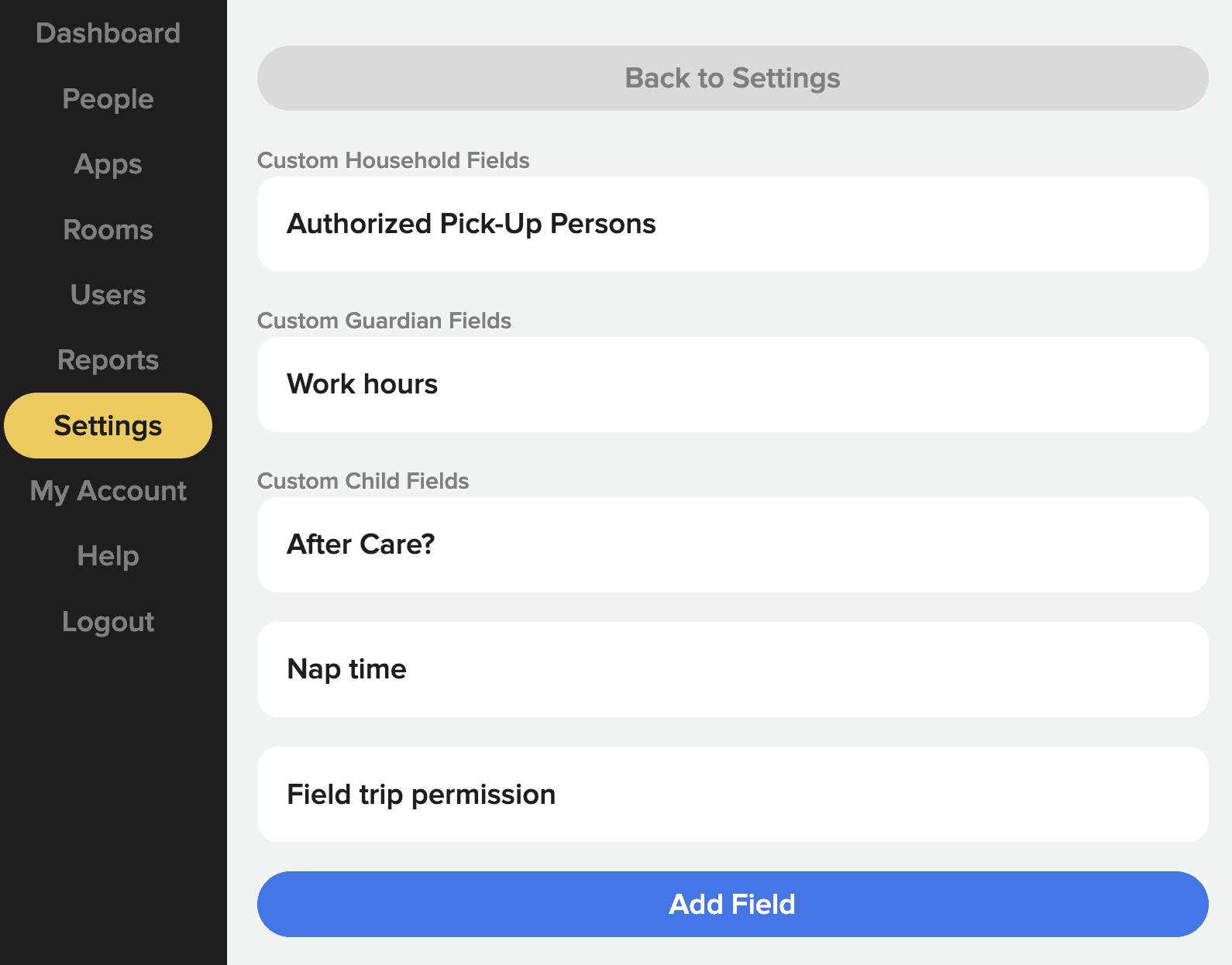
The key is not having dozens of fields, it’s having the right ones, collected at the right moment.
5. Where Custom Fields Should Appear
A well-designed check-in system allows custom fields to surface in multiple places.
During Check-In
Custom fields should be easy for parents or volunteers to complete without slowing the process.
On Child Profiles
Staff should be able to view and update custom field data at any time.
On Printed Labels
Critical information, like allergies, should be optionally visible on name tags so it’s immediately accessible.
In Reports and Exports
Custom field data should be searchable, filterable, and exportable for attendance tracking, audits, or planning.
If custom fields only live in one place, they lose much of their value.
6. How Kidddo Handles Custom Fields Differently
Kidddo was designed for organizations that need flexibility without complexity.
With Kidddo:
Custom fields are easy to create and edit
Fields can be attached to child profiles
Select fields can appear during check-in
Important fields can optionally be printed on labels
All custom field data is included in exports and reports
There’s no per-field or feature-based pricing
This means you can adapt the system to your real-world needs without changing your workflow - or training volunteers on something complicated.
7. What to Look for When Evaluating Custom Fields
When comparing check-in systems, ask these questions:
Can I add and edit custom fields without technical help?
Can fields appear at check-in and on labels?
Is the data easy to view later?
Can I export or report on custom field data?
Are there limits or extra costs tied to custom fields?
If the answer to any of these is "no" or "it depends", you may run into friction later.
8. Frequently Asked Questions (FAQ)
What are custom fields in a check-in system?
Custom fields are user-defined data fields that allow you to collect information beyond basic names and contact details, such as allergies, notes, or permissions.
Can custom fields appear on printed check-in labels?
In the best systems, yes. Displaying key custom fields on labels ensures volunteers have immediate access to critical information.
Are custom fields hard to set up?
They shouldn’t be. A good check-in system allows non-technical users to create and manage custom fields in minutes.
Can I export custom field data?
Yes. Custom field data should be included in reports and exports so it can be used for attendance tracking or administrative needs.
Do custom fields cost extra?
Some platforms charge per feature or per field. Kidddo includes custom fields as part of its standard pricing.
9. Try a Check-In System With Custom Fields (Without the Headaches)
If custom fields are a must-have, not a nice-to-have, you need a system built around flexibility and clarity.
Kidddo lets you:
Capture exactly the information you need
Surface it where it matters most
Keep check-ins fast and simple
Avoid over-engineered setups
👉 Start a free trial of Kidddo and see how custom fields should actually work.